See how we prove the work.
Five sample views of MillenniumOS, the same system every account runs on. Every number below is illustrative, built from one fictional building, not a real client record.
How does Millennium Facility Services prove cleaning was done? Through MillenniumOS: GPS-geofenced clock-in and clock-out on every shift, a QR scan per room to confirm the crew was physically there, a photo-documented inspection score for every area, and SmartClean IoT sensors that auto-confirm high-traffic spaces were serviced. Clients see all of it in a live portal.
MillenniumOS is our white-labeled version of Embeea, a facility management platform built by the same team that runs Millennium.
Pick a night, replay the route
GPS check-in, the planned window per zone, and the actual scan. Switch tabs to see a clean night, a missed zone, and a deficiency that took longer to close. Tap any zone for its detail.
Tap a zone for its scan time, minutes in zone, and score.
From photo to closed work order
Step through Found, Work order, and Fixed, and watch the photo and timestamps change. A 13-week view below shows how fast issues get closed across the building, tap any week for detail.
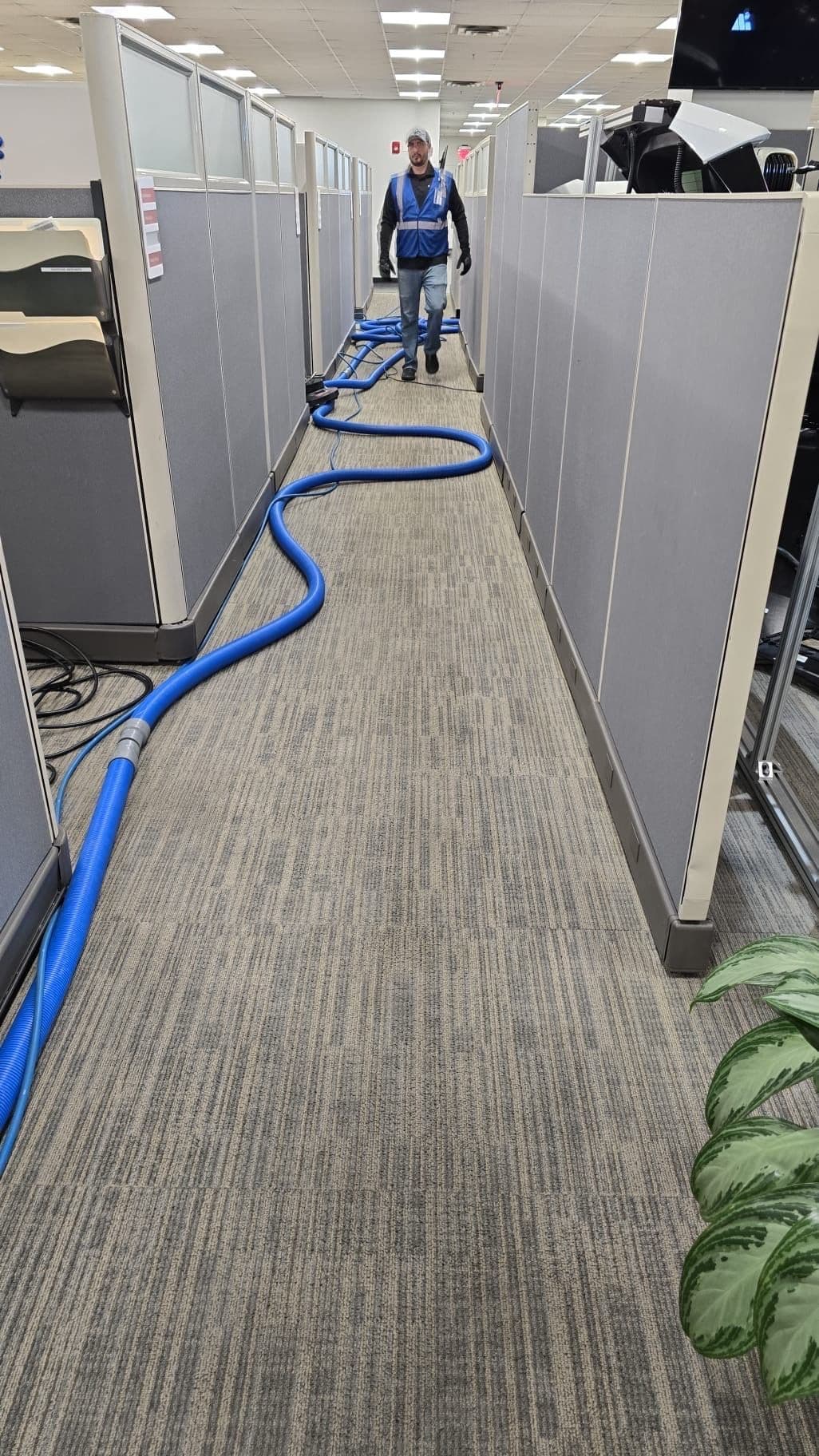
Flagged during a routine inspection pass of the office corridor.
Carpet soiling along the office corridor between restroom visits, noticed during a weekly inspection. Carpet care runs through IICRC-certified technicians.
Twelve weeks, every area
A dip shows up fast, and so does the recovery. Tap any cell, including the low one, to see what happened.
12 weeks of inspection scores by area. Click any cell for detail.
| Area | W1 | W2 | W3 | W4 | W5 | W6 | W7 | W8 | W9 | W10 | W11 | W12 |
|---|---|---|---|---|---|---|---|---|---|---|---|---|
| Loading dock | ||||||||||||
| Warehouse floor, aisles 1 to 3 | ||||||||||||
| Warehouse floor, aisles 4 to 6 | ||||||||||||
| Breakroom | ||||||||||||
| Restrooms A | ||||||||||||
| Restrooms B | ||||||||||||
| Office corridor | ||||||||||||
| Entry glass and lobby |
The transition tracker, task by task
Who owns each step, when it was supposed to finish, and when it actually did. Tap any task, including the one that ran late, for detail.
Tap a task for its owner, what done means, and status.
What a night looks like on paper
A sample labor plan by building type: hours by area type, crew size, and the assumptions behind them. Switch the tabs to see a distribution center, a manufacturing plant, and an office. Tap an area for the tasks behind it.
Tap an area in the legend for the tasks and hours behind it.
| Area type | Frequency | Traffic | Note |
|---|---|---|---|
| Warehouse floor | Nightly | High | Forklift and foot traffic across pallet aisles |
| Dock and receiving | Nightly | High | Scheduled around freight windows |
| Restrooms and breakroom | Nightly, 2x on weekdays | Medium | Scaled to headcount on site |
| Office and corridor | Nightly | Medium | Carpet and hard floor mix |
| Exterior and entry | Nightly | Low to medium | Glass, mats, and entry policing |
Questions about the technology
Every shift is tracked through MillenniumOS. Crews get a GPS-geofenced clock-in and clock-out, and scan a QR code in each room or zone to confirm they were physically there. A missed zone is flagged automatically rather than discovered later.
Shift completion by zone, the QR scan history behind it, photo-documented inspection scores, and open and closed work orders with time to close, all specific to your building.
Yes. SmartClean places sensors in high-traffic spaces like restrooms, connected over Verizon LTE. Usage triggers a service visit, and the visit is auto-confirmed by the sensor rather than a self-reported checklist.
MillenniumOS is our white-labeled version of Embeea, a facility management platform built by the same team that runs Millennium. It runs GPS shift verification, digital inspections, work order tracking, and the client portal.
When an inspection finds a problem, MillenniumOS opens a work order automatically with a timestamp and a photo. Time to close is tracked for every issue, so you can see how fast problems get fixed over time.
The system flags it automatically, since the expected QR scan never came in. The miss is visible on the dashboard the same night, and it is typically caught and corrected on the next shift's pass.
A structured transition with a named account manager and site supervisor, milestone dates, and parallel staffing before the incumbent provider leaves. The transition itself is tracked in MillenniumOS, not a spreadsheet that goes stale.
Yes. A facility assessment produces a labor plan broken out by area type, with crew size and task-level hours, before the first shift runs, the same way the sample plan on this page is built.
Your building gets a real version of all five.
A facility assessment maps your building the same way, with your zones, your schedule, and your numbers.